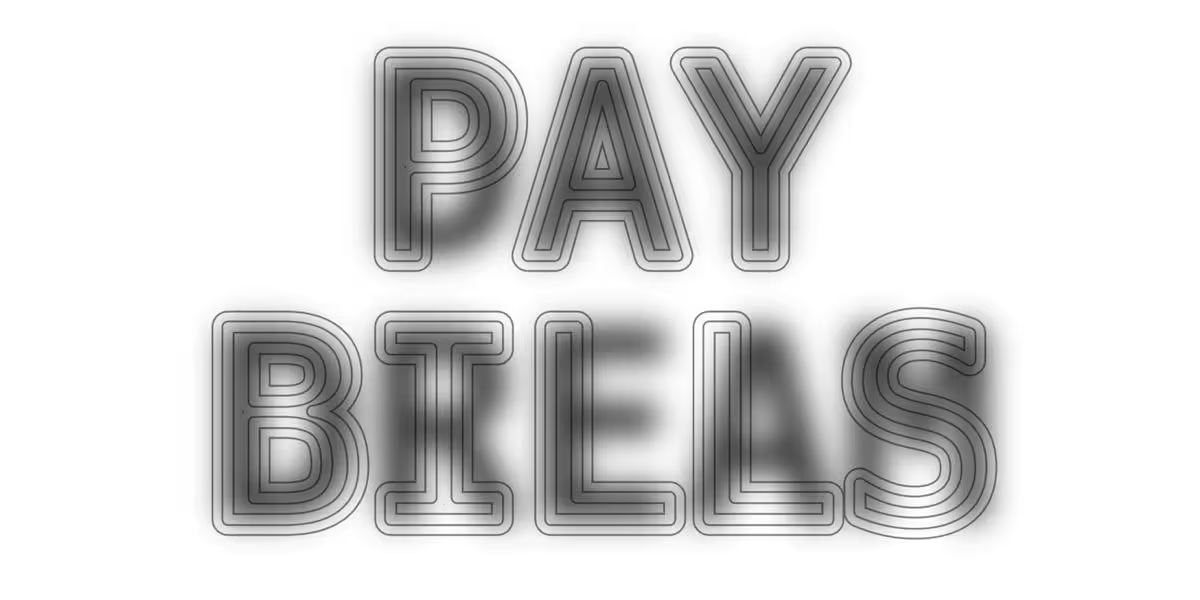
There is a typeface designed for a very particular purpose: to show one thing to human eyes and another, completely different thing to AI. It is called Decoy Font and exploits the principle of spatial frequencies, i.e. the quantity of details and light variations present in a given portion of the surface. In practice, two different shapes are superimposed in the same space occupied by a single letter: in the foreground thin and sharp high-frequency outlines, in the background a low-frequency blurry mass. Up close you can read a character; by moving away from the screen, or by squinting your eyes, the perception changes and the “hidden” letter emerges.
The mechanism is based on the use of hybrid images, a well-known optical illusion that has been studied for some time. A famous example of a hybrid image is the fusion of the faces of Albert Einstein and Marilyn Monroe, where one or the other emerges depending on the distance from which the image is observed. The creator of the project, available on X with the account @ericlu, developed it within the Mixfont laboratory, applying the same hybrid image technique to letters to protect texts from automatic monitoring.
How Decoy Font Deceives AI: How It Works
But why is this font able to fool machines? Most AI models and OCR systems (Optical Character Recognition), the technology that allows software to recognize and convert text in an image into digital characters, analyzes images pixel by pixel, up close. When you pass a screenshot written in this font to advanced tools, the algorithms focus on the sharp lines in the foreground and ignore the blurry shape in the background. The result is a completely wrong word returned by the machine, while the human eye continues to read the real message without difficulty. According to tests reported by the creator of the font, the illusion manages to fool even advanced models such as GPT Sol and Gemini 3.5 Thinking.
Unlike other similar experiments designed to combat scraping, such as the Ghost Font, which requires animated text or moving files to work, the Decoy Font is distributed as a simple TTF file (TrueType Fonts), the standard typeface format, with letterforms derived from the open source font DejaVu Sans Mono. This means it can be downloaded, installed on your system and typed directly into graphics or word processing programs to generate ready-to-use documents or images. The font is also distributed free of charge, both for personal and commercial use, including in projects created for clients.
It must be said that this is not a foolproof security solution, nor a replacement for actual encryption. AI models with advanced coding capabilities may be able to overcome reading the foreground text alone, and with appropriate prompting some agents may already know to look for hidden letters. Its effectiveness, however, lies precisely in creating a first level of confusion: an immediate obstacle capable of discouraging random scanning and the indiscriminate collection of data and intellectual property.
Possible uses of the font
Future applications could be numerous: from integration into CAPTCHA systems (the tests used by websites to verify that the user is a real person and not a bot) to the creation of private messages, up to the development of tests to evaluate the real visual capacity of future frontier models, those AI systems which, as their “intelligence” improves, could learn to understand the technique behind the illusion and decode both levels of text. An interesting extension concerns ideographic alphabets such as Chinese: according to the creator of the font, the characters of these languages, having more uniform sizes and shapes, would lend themselves particularly well to hiding a message, making the technique potentially even more effective.
How to prove the font that fools the AI
In the meantime, it is already possible to try the character and challenge your favorite AI to decipher the hidden code. To test the font, just follow these steps:
- Go to this page.
- Fill in the Hidden message and Decoy message fields by writing, respectively, the hidden message and the visible message in the appropriate text fields.
- Click on the down arrow symbol to download the message in an image format.
If, however, you want to download the font to your computer and use it locally, follow these other steps.
- Go to this page.
- Go to the Download Decoy Font section and click on the downward arrow icon to download the font in TTF format.
- Then install the font: on Windows, open the Control Panel > Appearance and Personalization > Fonts menu and drag the .ttf file into the appropriate window; on Mac, open the Font Book application and drag the downloaded .ttf file into it.
- Restart your computer.
- Recall the Decoy Font from the font selection menu on your favorite word processing software (e.g. Word, Pages, LibreOffice Writer, etc.).