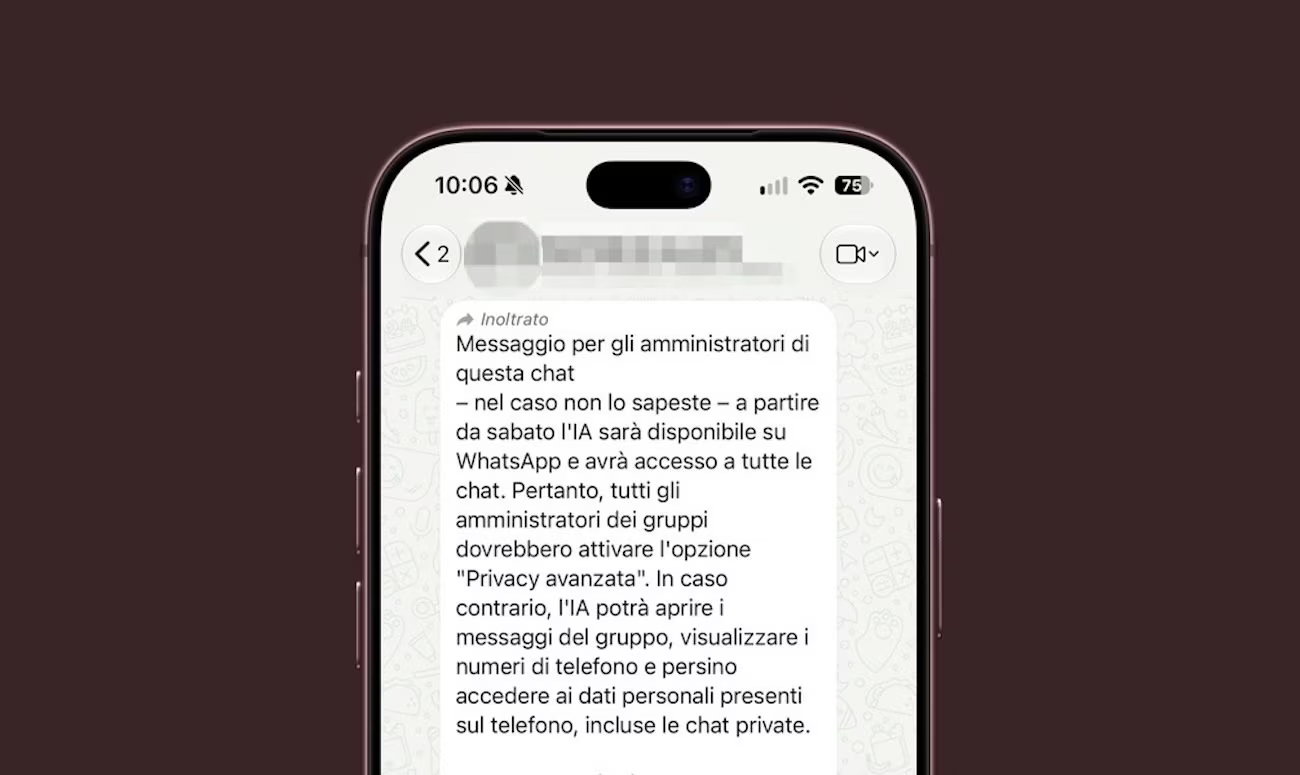
«From Saturday the AI will be available on WhatsApp and will have access to all chats. Therefore, all group administrators should enable the “Enhanced Privacy” option. Otherwise, the AI will be able to open group messages, view phone numbers and even access personal data on the phone, including private chats». If you have ever received a message like this in one of the WhatsApp groups in which you are included as a participant, don’t worry: it is not an official notice from Meta, but a hoax, yet another chain letter that exploits fear to push users to forward content without verifying its real origin. If you were to receive the message we just referenced, the best thing to do is to break the chain by not spreading it yourself. The AI will not have automatic access to all chats.
In some cases, the message may be accompanied by the words “Forwarded many times”, an indication that should already make you prick up your ears: it means that the text has been shared repeatedly and does not allow you to trace the source from which it originated. The content also presents all the typical elements of hoaxes circulating on messaging apps: an imminent change, an alleged threat to privacy and a procedure to follow immediately to protect yourself. Let’s unpack this message carefully and see why it is a hoax. Then we will also see what the “Advanced Privacy” function it refers to is and what it is really for.
The fake Chain of San Antonio on privacy and AI
The text of the message claims that the AI would become available on WhatsApp starting Saturday (without specifying which Saturday) and that, without “Enhanced Chat Privacy” enabled, Meta’s AI could read group messages, view phone numbers and even access private chats. Group administrators are then advised to access the conversation information and activate the appropriate setting.
The problem is that this reconstruction does not correspond to what WhatsApp explains in its documentation. Meta AI, i.e. Meta’s artificial intelligence service integrated into WhatsApp, will not be included from next Saturday: it has already existed for some time and in Italy it has been available on WhatsApp for more than a year. This feature can be used to answer questions, provide suggestions, help come up with ideas, or create AI-generated images. It is also possible to interact with Meta AI within existing group chats.
This, however, does not mean that artificial intelligence automatically has access to conversations. WhatsApp, on its support page, specifies the following in black and white:
All chats are private by default. Your personal messages are always protected by end-to-end encryption. Meta AI cannot access your chats. It can only read messages that people decide to send to this tool and nothing else. This applies whether Enhanced Chat Privacy is turned on or off.
What happens when we use Meta AI and how to defend yourself with advanced privacy
The chain letter, although spreading a clearly false message, however contains a truly existing element which can give the message a certain aura of truthfulness. In the text of the latter, in fact, reference is made to advanced chat privacy, a function that actually exists in WhatsApp. But this has a different purpose than the one described in the hoax message. This is a setting that allows you to limit how participants, and not AI, can share messages and media files outside of WhatsApp. To activate it in group chats, you need to follow these steps:
- Start the group chat on which to activate the setting.
- Tap on the chat name, located at the top of the screen.
- Scroll down the menu that opens and tap Advanced Chat Privacy.
- In the screen that opens, move the switch next to the wording Advanced privacy in the chat to ON.
- By going back with a series of repeated taps on < and going to the main chat screen, you will see a confirmation message regarding the activation of the function.
When enabled, in affected chats, participants cannot automatically save media files to their device’s gallery, export the conversation, or ask Meta AI to answer questions, create images, or generate summaries within that chat. But from here to saying that the function serves to prevent Meta AI from spying on us, there is a big difference.
What happens when we use Meta AI
While using Meta AI will not give Meta’s AI access to all of your chats, it is important that you are aware that what you share with the AI does not remain secret. When you voluntarily choose to use the service, Meta and its employees can receive and read the prompts, i.e. the requests you write to the artificial intelligence, the messages you decide to share with this technology and the feedback necessary to provide the answers. Meta may also receive information about your device, connection and how you use Meta AI.