The official Instagram app arrived on iPad. For about 15 years, users have had to settle for adapted versions or simple access via browser, while now it is finally possible to download the official app with a new interface designed specifically for the Apple tablet. The installation is free of the application of the goal through the App Store and requires the minimum requirement iPados 15.1 as a minimum requirement. This means that if your device is updated at least to that version, you can access without difficulty for all the new features designed for the large IPAD screen. To install it, simply search for it on the store and press the “Get/install” button to start the download by authorizing it with your password or via ID/Touch ID. In addition to describing the main innovations in this version of the Instagram app issued on Wednesday 5 September 2025, we will also show you how to configure Instagram on iPad.
The new Instagram app for iPad: the features
Before seeing how to install the Apple Social Network app on the iconic Apple tablet, let’s see what some features of the Instagram app for iPad are. In the announcement with which the app was made official, in this regard Meta said:
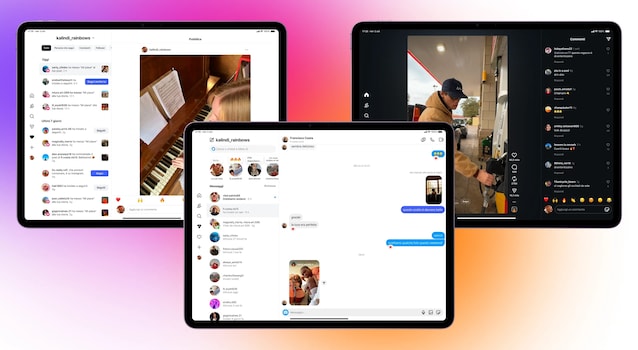
With Instagram for iPad, we have redesigned the experience for use on larger screens, allowing more comfortable entertainment. Now, when you open the app, see the Reels immediately, so you can enjoy the entertainment content you prefer on a larger screen. At the top you will also see the stories, so you can easily connect with the most important people for you and send messages with a single touch.
The Instagram application was therefore entirely redesigned to fully exploit the large screen of the iPad. The arrangement of the various contents – Reel and stories in the first place – was designed to make the connection with friends and creators more immediate followed by the user. In addition, the “followed” card, the section that allows you to check more orderly the novelties of your favorite accounts, offers three viewing modes:
- All, which shows the contents of each profile followed with the addition of recommended.
- Friends, where only mutual updates appear, that is, of the people you follow and who in turn follow you.
- More recent, which has the posts in chronological order, putting the most recent publications at the top.
From a technical point of view, Instagram on iPad uses the extra space of the display to better manage notifications and messages. Thanks to a double column layout, you can read conversations without abandoning the main screen. While visiting the Reels, the comments expand laterally without reducing the video, allowing you to follow the reactions of the community at the same time and the content itself. In this way, the app becomes more versatile and less dispersed than the smartphone version.
How to install and use Instagram on iPad
Now let’s see how to install and use Instagram on iPad. You can proceed by following these simple steps:
- Open the App Store, tap the magnifying glass, look for “Instagram” in the search bar and select the correct result to go to the app download page.
- Touch Get/Install and provide the Apple Account Password or Used Face ID or Touch ID to authorize the download.
- Take Tap on Open or tap the Instagram icon appeared in the Home screen or in the App Library.
- Access with your account by providing username and password or touching one of the accounts that are already saved on the iPad.