Meta is introducing a new function on WhatsApp to make conversations private with Meta AI, the artificial intelligence integrated into the messaging platform. The function in question, called Incognito Chat, is a mode that essentially allows you to communicate with the chatbot without the conversations being archived, and without them being able to be read even by Meta itself. At the moment the function is not yet available to everyone: its global release could take place in a few months.
How incognito chats with Meta AI work and why they are useful
The incognito chats feature with Meta AI is based on a technology called Private Processing, a data processing system designed to prevent the company from accessing chat content. Messages are processed in an isolated and secure environment, separate from the normal systems of the Meta ecosystem. When you open an incognito chat with Meta AI, a temporary session is essentially created that remains visible only to the user: conversations are not permanently archived and messages automatically disappear after use.
Now let’s see what you can do with incognito chats with Meta AI. Basically, we can do everything we can already do with free-to-air chats with Meta AI but, being able to take advantage of greater privacy, the user can feel more free to question the chatbot on delicate and personal topics. These include, for example, medical questions, which could therefore have to do with health, advice on one’s career or finances, support in writing documents containing details about one’s private sphere, and so on. In general, the idea is to offer a more protected and confidential space for all those questions that many users hesitate to ask via traditional chatbots.
Meta points out that other apps have already introduced “incognito” modes, but that in many cases the system still continues to record the requests or responses generated. Here’s how Zuckerberg’s company expressed itself on the topic:
Other apps have introduced “incognito” modes, but you can still see incoming questions and outgoing answers. Incognito chat with Meta AI is truly private: no one can read your conversation, not even us.
According to Meta, the difference in its incognito chats lies precisely in the level of isolation guaranteed by the Private Processing technology.
How to activate incognito chats with Meta AI
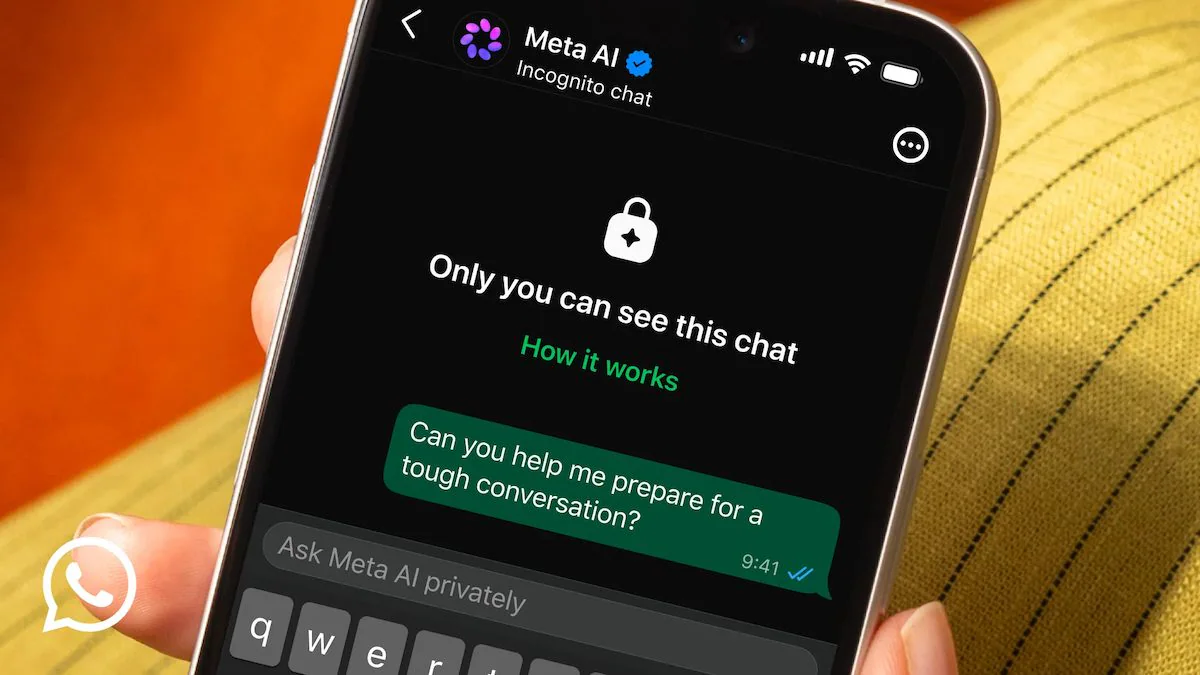
To use the new function, simply open a chat with Meta AI and select private mode by touching the speech bubble icon with dotted outlines. The interface will clearly indicate when you are in an incognito session: among the various details that indicate this, there will be a closed padlock, which will stand out in the center of the screen, as you can see in these screenshots.
Regarding the availability of the function, Meta has announced that its release will take place gradually over the next few months, both on WhatsApp and on the Meta AI standalone app. In parallel, Meta has anticipated another function linked to the same technology: private “side chat”. In this case, Meta AI will be able to assist the user directly within an already ongoing WhatsApp conversation, understanding the context of the discussion without interrupting the main dialogue. This function, arriving in the next few months, will also rely on the Private Processing system of the Menlo Park giant.