The new IT-Wallet is finally available and the developers of the IO app are informing users about it via in-app notifications and via email. Be careful, however, because cyber criminals could exploit the novelty to send messages that imitate perfectly (or almost perfectly) those of the IO app and could trick you into downloading malware onto your device. The CERT-AGID, or the Computer Emergency Response Team of the AGID, has in fact identified a fraudulent domain which imitates the official website of the Revenue Agency and is used to distribute a malicious Android application which is presented as an alleged update of the IO app.
The goal is to convince users to download an APK file, which is a package used to install applications on Android devices, by presenting it as a necessary update to continue using IO. However, the package contains malware capable of stealing banking credentials, intercepting security codes and allowing cybercriminals to remotely control the smartphone. You understand well that the situation can be very serious if you fall into the trap set by cyber criminals. Let’s see, therefore, how to distinguish the two messages – the fraudulent one from the authentic one from the IO app via the email [email protected] – and how to avoid running into possible problems.
How the fake IT-Wallet activation procedure works
The malicious campaign identified by CERT-AGID exploits a site that graphically reproduces that of the Revenue Agency. The fraudulent content is shown exclusively when the site is visited by a mobile device, recognized through the User-Agent, i.e. a string of information that the browser communicates to the website and which allows, among other things, to identify the type of device used.
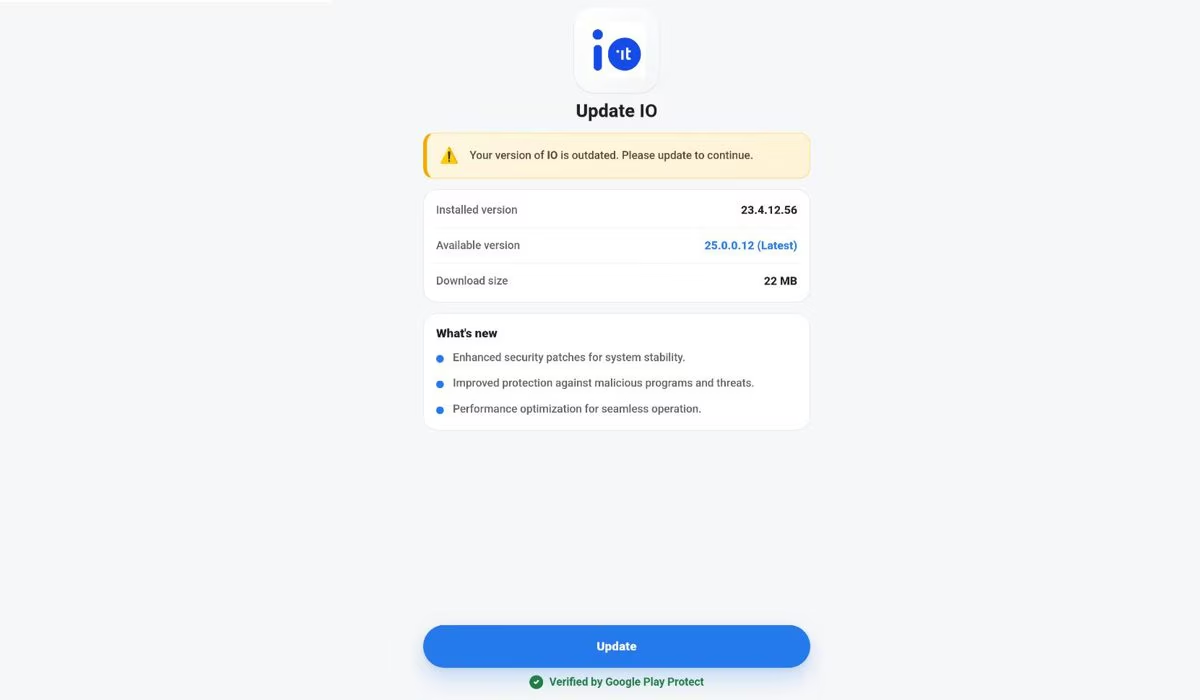
Once the downloaded application is launched, an additional element of deception comes into play: a screen that reproduces a fake IO app update. The user is asked to download and install a new APK, described as essential to continue using the service.
To make the message more convincing, cyber criminals have also inserted a reassuring green wording that reads “Verified by Google Play Protect”. This is a reference to Google’s security system that monitors Android applications for potentially malicious behavior. Its presence on the screen, however, does not constitute a guarantee of authenticity of the file you are about to install, on the contrary. In this case it is in fact used precisely to convey a false sense of security.
The analysis of the APK file allowed the CERT-AGID experts to trace the application back to the Mirax family, a malware for Android that combines the characteristics of a banking trojan and a RAT (Remote Access Trojan). A banking trojan is, essentially, malicious software designed to steal financial information and banking credentials; RAT is a threat that allows attackers to access and control a device remotely.
Mirax’s abilities are particularly treacherous. In fact, this malware can steal a lot of sensitive information, including SMS that contain OTP codes (One-Time Password) used to confirm certain transactions or complete identity checks.
Not only that, but through the abuse of Android Accessibility services, the malware is even able to gain control over the compromised device and can overlay spoofed screenshots on top of legitimate applications. This technique, called overlay, allows you to show windows that imitate those of a banking app and trick the user into entering their credentials in an interface that is effectively controlled by the attackers.
How to recognize authentic IO communication
To avoid running into these problems, it is important to be able to distinguish legitimate communication sent by the IO app developers from scam attempts. To do this, the first thing to check is the sender’s address. Authentic emails sent by IO come from [email protected].
The message in question, then, does not ask to visit the Revenue Agency website or other web pages and, above all, it does not ask to download applications or other resources. Much more simply, the legitimate communication sent via email by the developers of the IO app contains a button called Open the app, which you must press to directly launch the IO app already installed on your smartphone. It is within the official application that you will then need to complete the guided procedure, performing authentication via SPID or CIE.
If a message received via email has characteristics different from those we have just described, ignore it because it is certainly a scam.
CERT-AGID App IO